
Lesson Plan Format for CBSE and NCERT Teachers (and a Teaching Record)
CBSE and NCERT do not prescribe one lesson plan format. Here are the parts most formats share, a short example plan, and how to keep a dated record of what you actually taught.
By Prof. Rahul R. Keshwala, Founder
There is no single lesson plan format that CBSE or NCERT requires every teacher to use. Schools, B.Ed. colleges and training programmes each have their own. Almost all of them share the same parts: the chapter and topic, the number of periods, learning objectives, materials, an introduction, teaching steps, an activity, assessment, homework and a reflection after the class. Below is a format built from those parts, a short example, and how we keep the record of what was actually taught afterwards.
The same parts work just as well for another board, a college lecture or a coaching batch; only the textbook names change.
- What you intend to do
- Written before the bell
- Helps you walk in prepared
- What you actually did
- Written after the period
- Shows where the class really is
Teachers are usually asked for both, and they are not the same thing. Plans change the moment the bell rings: a question takes twenty minutes, half the class was away for a function, the projector does not work.
The common parts of a lesson plan
- 📘 Class and topicSubject, chapter and topic, named as in your textbook edition
- ⏱️ PeriodsBe honest: three periods will not fit in two
- 🎯 ObjectivesTwo or three actions: explain, list, compare, solve, draw
- 🧰 MaterialsTextbook pages, objects, a chart, a video
- IntroductionA question or demonstration linked to what they know
- Teaching stepsWhat you explain, in order, with examples
- ActivityStudents do something in pairs or groups
- AssessmentOral questions, a short check or an exit question
- HomeworkUsually from the textbook exercises
Then a reflection, filled after the class: what worked, what to repeat, what was left.
The 5E model
One common way to organise the middle of the plan, especially in science, is the 5E model. It fits the activity-based approach of the newer NCERT textbooks well, but it is one model among several. If your school has a format, use theirs.
- EngageRaise curiosity
- ExploreStudents try something
- ExplainPut words to it together
- ElaborateApply it to a new situation
- EvaluateCheck understanding
An example plan: friction, Class 8 Science
Friction is taught in middle-school Science. NCERT has been releasing new textbooks, so check the chapter name and number in the edition your school uses before you copy this.
- Class and subject: Class 8, Science
- Topic: Friction: what causes it and what it depends on
- Periods: 2 of 40 minutes
- Objectives: Students will be able to (1) explain friction as a force that opposes motion between two surfaces, (2) give two everyday examples where friction helps and two where it is a nuisance, (3) predict whether a rough or smooth surface gives more friction.
- Materials: textbook, a book, a ruler, sand paper or a towel, a smooth tile or glass sheet, a small toy car or a marble.
- Homework: Selected textbook exercise questions on the topic.
- Reflection (after class): Did every group finish the activity? Which objective needs another five minutes next period?
- Engage, 5 minWhy is a wet floor slippery? Why does a rolling ball stop?
- Explore, 10 minGroups roll the car down a book onto the towel, then the tile
- Explain, 10 minFriction from their results; rough surfaces at a small scale
- Elaborate, period 2, 15 minWhere friction helps (brakes, writing, walking); where we reduce it (oil, ball bearings)
- Evaluate, 10 minThree oral questions; exit question: why do shoes have grooves?
That is enough for most periods. A plan that fits on one page is one you will actually look at in class.
Keeping the record of what you taught
To be clear, Veda does not write lesson plans for you, and there is no lesson planning module. What it does give you, free, is the other half: a teaching journal per subject. After each period you add a dated entry with what was covered and the homework that went out. Over a term it becomes your syllabus coverage record, whichever board, course or batch you teach.
- Open the subject and tap Teaching Journals in the Android app, or open the subject's Teaching journals page on the web and tap New entry.
- Check the date is the day you taught. You can pick an earlier date if you are catching up.
- Write the topic as the textbook names it, for example "Friction: causes and factors".
- Add the Covered points in short lines, including what was left for next time. This is where your reflection goes.
- Add the Homework. Then save.
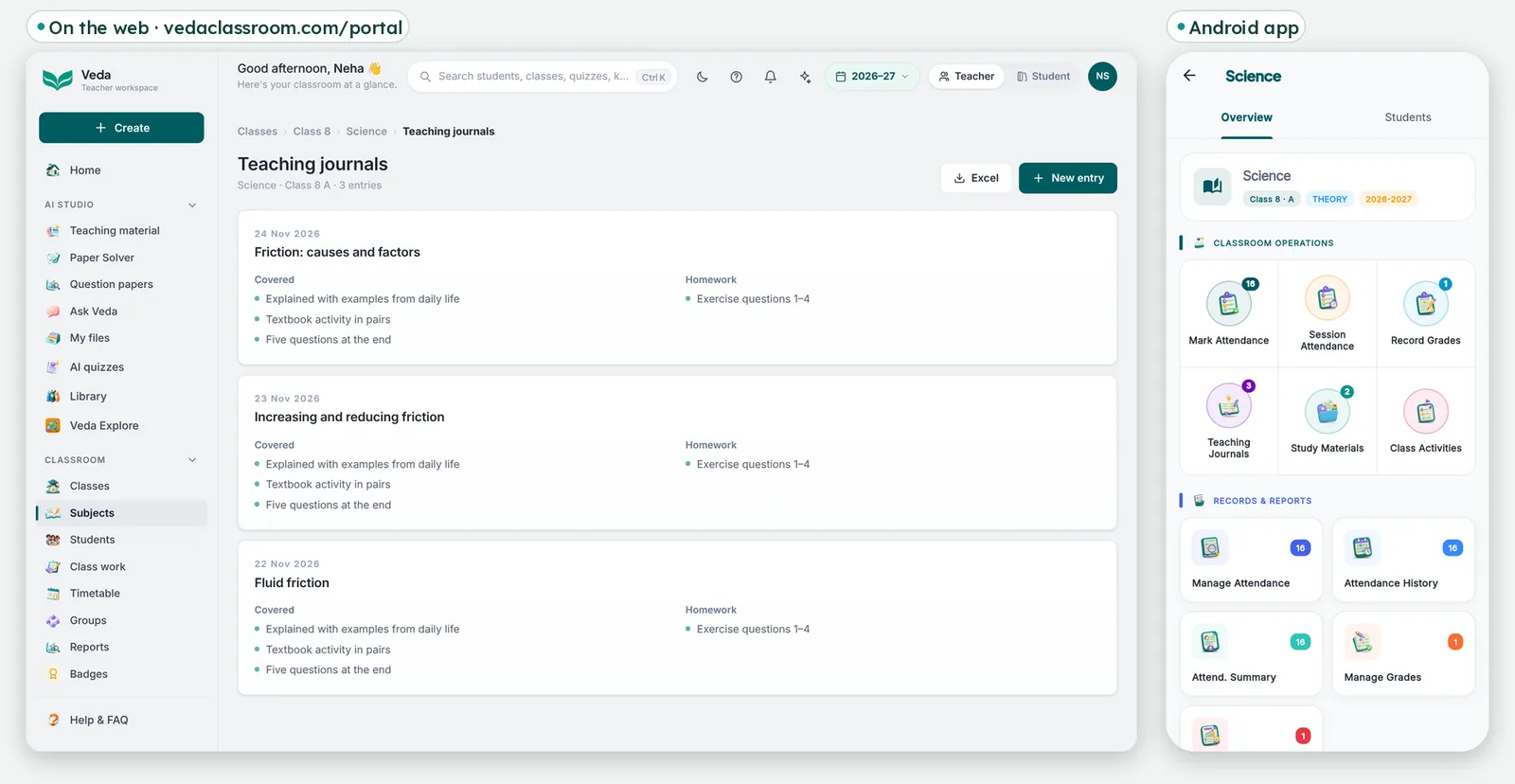
When the coordinator asks for the record, the journal downloads as an Excel file, day by day. The journal is the same in the Android app and on the web at vedaclassroom.com/portal with one account, so an entry written on your phone after the period is there on the computer in the evening. We wrote more about the habit in recording what you taught, lecture by lecture.
Your timetable in the same place
A plan tells you how many periods a topic needs. Your timetable tells you when those periods are. In Veda you add each weekly period with the class, subject, day, time and room. The home screen then shows Teaching today, with Start attendance on each period, and a reminder comes about 10 minutes before the lecture. It is free, like the journal.
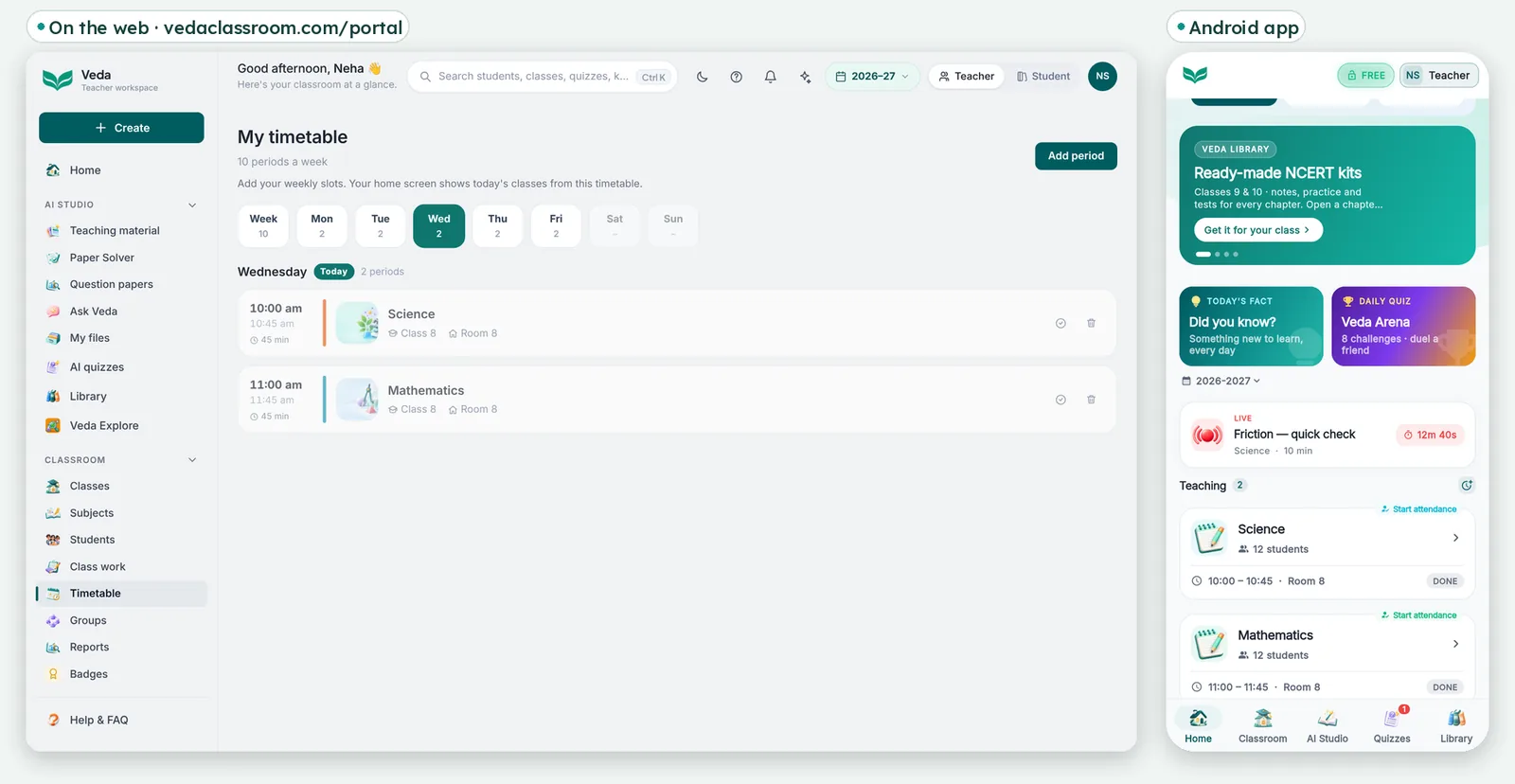
Both are described together on our teacher diary app page.
What it can't do, and what to check
- It does not write or store lesson plans. Keep your plans in your school's format, in a notebook or a document. The journal is for what happened.
- It does not fill itself. If you skip entries, the record has gaps.
- Check your school's rules. Some schools want the teacher's diary in a printed format. The journal export has the same information, date, topic, covered and homework, but whether it is accepted is the school's decision.
- Students do not see the journal. It is private to you.
Questions teachers ask
Does CBSE prescribe a lesson plan format?
Not one fixed format for every teacher. Schools and training programmes set their own. The parts listed above appear in most of them.
Can Veda make a lesson plan for me?
No. Veda has a free teaching journal to record what you taught, and a timetable, but no lesson plan writer.
Can I export my teaching record for the school?
Yes. Each subject's journal downloads as an Excel file, day by day.