
A Free Attendance App for Teachers: Seven Things to Check First
Whether you teach a school class, a college course or a tuition batch, before you move your register to a phone check seven things: phone and web, P/A/L/E, corrections, an Excel register, student limits, privacy and cost. Here is the checklist, and how Veda does each.
By Miss Shanti Divaraniya, Co-founder
A good free attendance app for a teacher should work on an ordinary Android phone and on a computer, let you mark present, absent, late and leave, let you fix mistakes later, give you a monthly register in Excel, put no cap on students, keep each student's record private, and charge nothing per student. Veda does all of these, free, with no limit on classes or students, for a school class, a college lecture, a coaching batch or a tuition group, in more than 40 languages. Below is the checklist we would use ourselves, and how Veda handles each point.
Most teachers who look for an attendance app are not unhappy with paper. They are tired of the totals: counting ticks at the end of the month, working out who is below the requirement, writing a summary for the principal or the head of department. An app is worth it only if it takes that work away without adding new problems.
- 📱 Phone and web?Mark in class, read the register at home
- ✅ More than P and A?Late and approved leave need their own marks
- ✏️ Can you fix it?Edit a session after saving
- 📊 A real register?A monthly file you can open and print
- ♾️ Any limit?On students, classes or batches
- 🔒 Who sees it?Each student only their own record
- 💰 What cost?Watch for a price per student per month
The checklist, and how Veda answers it
1. Does it work on the phone you have, and on a computer?
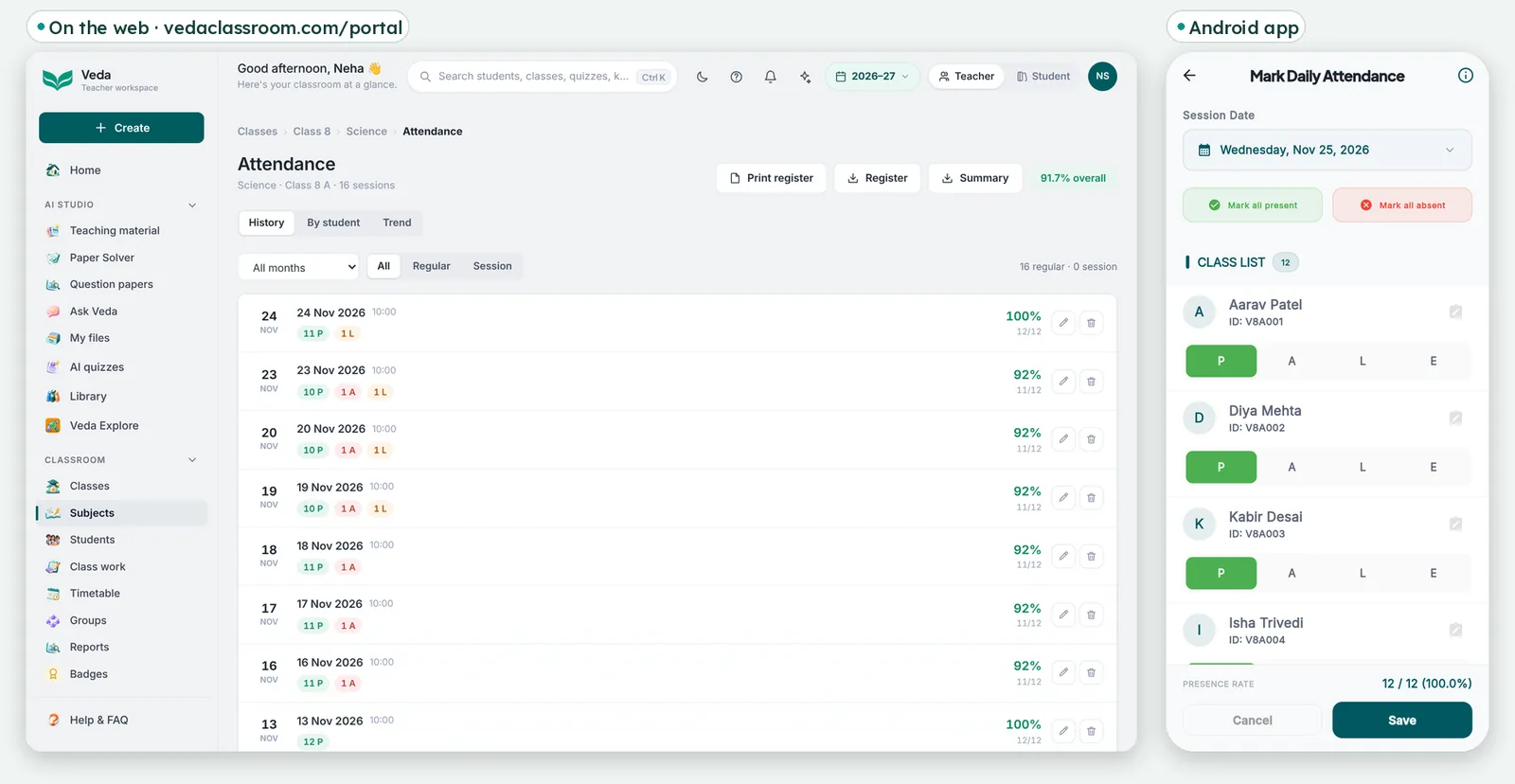
You mark on your phone in class, but may want the register on a bigger screen at home. In Veda: the Android app and the web portal at vedaclassroom.com/portal use the same account. A session marked on your phone shows on the computer, and the other way round.
2. Can you mark more than present and absent?
Real registers have late arrivals and approved leave. An app with only two buttons forces you to lie in one direction or the other. In Veda: each student is P, A, L or E.
- P: present
- L: late
- A: absent
- E: excused or leave
Mark all present and Mark all absent save time on big classes, and the presence rate shows before you save.
3. Can you fix a mistake after saving?
You will tap the wrong row sometimes, or a student walks in after you have saved. In Veda: open the session from the history, change the mark and save. On the web, every session in the History list has edit and delete buttons, and the percentages update.
4. Can you get a proper register out of it?
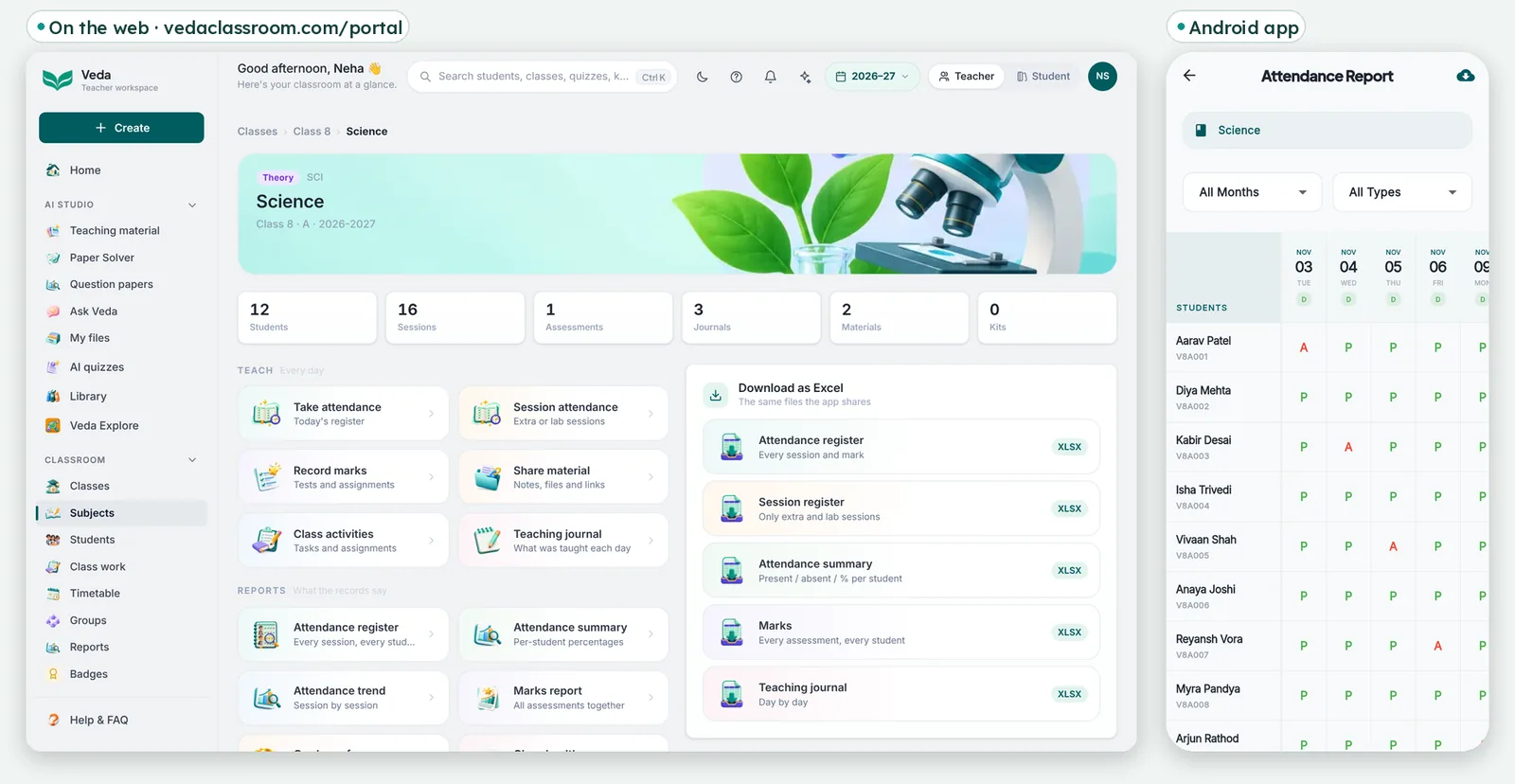
Sooner or later someone asks for a monthly register in their own format. In Veda: three Excel downloads, plus a Print register button on the web.
- 📘 Attendance registerEvery session and every mark
- 🧪 Session registerExtra and lab sessions, kept apart
- 📈 Attendance summaryPresent, absent and percentage per student
We wrote about formats in attendance register format for schools.
5. Is there a limit on students or classes?
Read the small print on any free plan. A cap that sounds generous can be one large classroom, and a tuition teacher with five batches reaches it quickly. In Veda: no limit on classes, subjects or students. Add students by hand, import them from Excel, pick them from your directory, or share a join code. Students you add by hand do not need the app for you to take their attendance.
6. Who can see the record?
Attendance is personal information. In Veda: each student who has joined sees only their own attendance and percentage, never anyone else's. Your registers are yours.
7. What does it cost, and per what?
A price per student per month looks small and grows with every batch. In Veda: attendance is free on every plan. It does not use AI credits, and there is no per-student charge. The only things in Veda that use credits are the AI features, such as generating a quiz or solving a paper.
How to try it in one week
- Create one classOr one batch, with the subject you teach
- Add the studentsFrom your Excel list, or by hand
- Mark tomorrowMark Attendance, or Start attendance in Teaching today
- Keep paper tooJust for this week
- Compare on SaturdayDownload the summary; check it against paper
Start attendance on a period appears once you have set your timetable.
If the totals match, you can trust it.
What it doesn't do
- No biometric or face attendance. You mark each student yourself. There is no fingerprint device or camera check.
- No parent login for individual teachers. Students see their own record. For parents, share the exported sheet or show the record. We wrote about that in a monthly attendance report for parents.
- Eligibility is the school's decision. The app shows each student's percentage. Whether that meets your board's, university's or institute's requirement, and which leave is approved, is for them to decide. Remember that Excused counts as missed in the percentage.
- It is only as right as what you tap. Glance at the presence rate before saving.
The full feature list is on our attendance app page, and you can download Veda here.
Questions teachers ask
Is the attendance app really free for a whole school year?
Yes. Attendance, the history and the Excel downloads are free on every plan, with no limit on classes or students, and they do not use AI credits.
Can I mark a student as on leave?
Yes. Mark E for excused or leave. It is recorded separately from Absent, but both count as missed in the percentage.
Do students need a phone for me to take attendance?
No. If you add students yourself, you can mark their attendance without them ever installing the app.