
Run a Coaching Class With AI: Batches, Daily Tests, Weekly Papers
A working routine for coaching and tuition classes: set up batches, run a short daily test, print a weekly paper with its answer key, keep attendance, and have a report ready when a parent asks.
By Prof. Rahul R. Keshwala, Founder
A coaching or tuition class runs on rhythm: the same batches, a short test most days, a full paper every week, attendance every session, and a report ready when a parent asks how their child is doing. In Veda, you set up each batch once, let the AI draft the daily questions and the weekly paper from your own syllabus, check them, and the attendance and marks you record become the report. The batches, attendance, marks and reports are free; the AI drafting uses credits.
We have spoken to many coaching teachers, from a single tutor teaching in their front room to institutes with several branches, and they describe the same week. Most of the work is not teaching. It is making tests, checking them and answering "how is my child doing?"
- OnceSet up batches and get students in
- Every sessionAttendance, then a short practice test
- Every weekA full paper, printed, with its answer key
- Every monthReports for parent meetings
Step 1: Set up your batches once
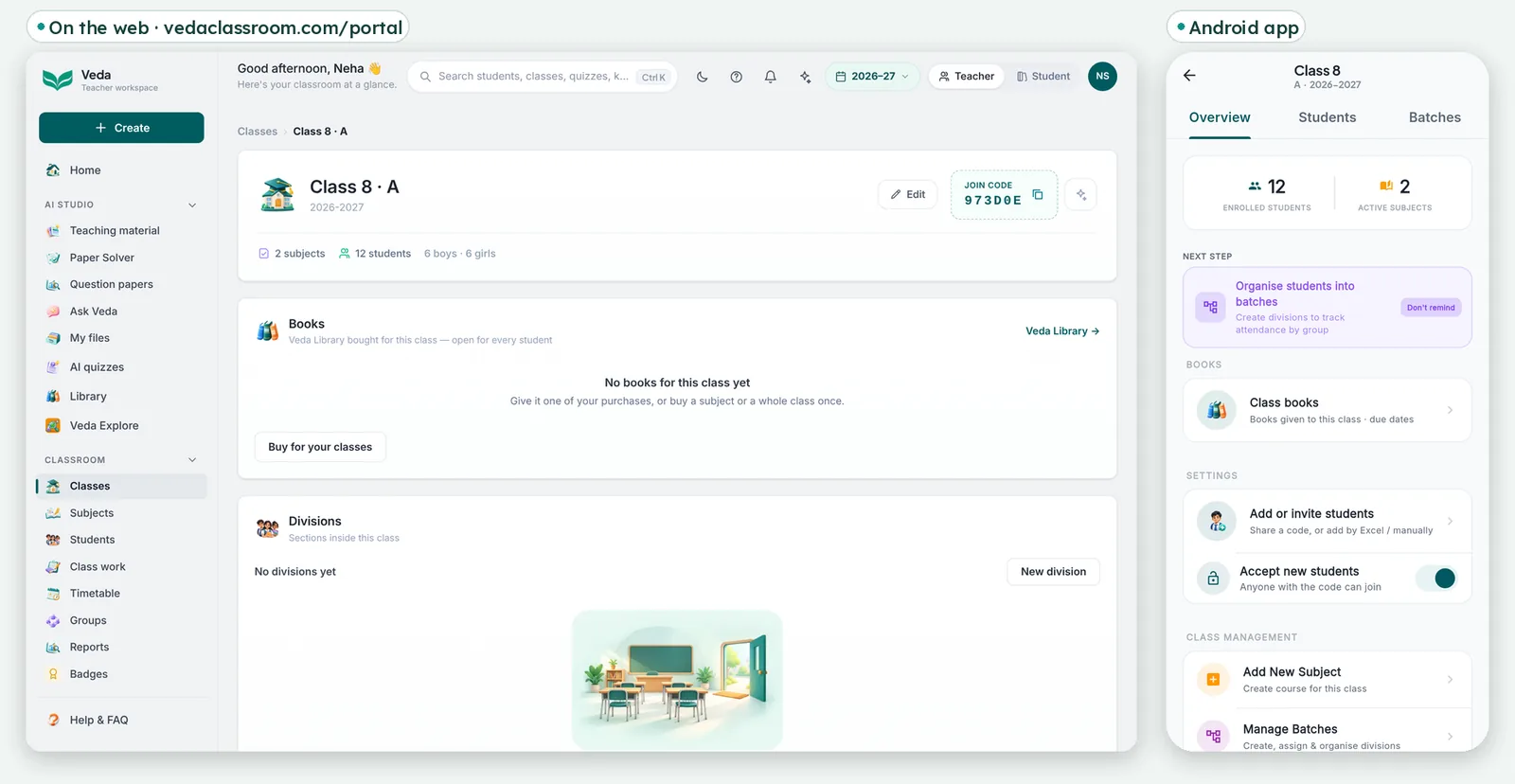
Create a class for each course or level and add the subjects you teach in it. Class names are yours, so "Target 2027 Morning" or "Grade 10 Weekend" both work. Students join with the class code, a QR code or a link, or you add them yourself or import them from Excel. Turn on Accept new students when admissions open and off when they close.
Two more ways to group students help in coaching:
- Batches inside a class, when one course meets at two different times.
- Groups, a list of students drawn from any of your classes, with its own attendance, marks and reports. Useful for a crash course, a doubt batch or a group that needs extra practice.
Step 2: A short test every session
Daily tests are the backbone of most coaching classes, and there is good reason for it. Learning researchers call it retrieval practice: pulling an answer out of memory strengthens it more than re-reading does. The test should be short and low-stakes, so it is done every day, not dreaded.
- Teachtoday's topic
- Testten questions, scored for you
- Read the resultswhich question most missed
- Open tomorrowwith that question
To make one, create an AI quiz from a topic, your pasted notes, a PDF, a YouTube lesson or a web page. Choose how many questions, the difficulty (Easy, Medium, Hard or Mixed), the marks and the language. You read and check every question before publishing. If you already have a question bank in a spreadsheet, Import from Excel brings it in without using credits, and you can type questions yourself too.
Assign the quiz to the class, or share it by code, QR, link or WhatsApp. Students play it in the Veda app on Android. You watch the live monitor, add time if needed, and afterwards see each score, a leaderboard, and a question-by-question view with the most common wrong answer.
Step 3: A full paper every week
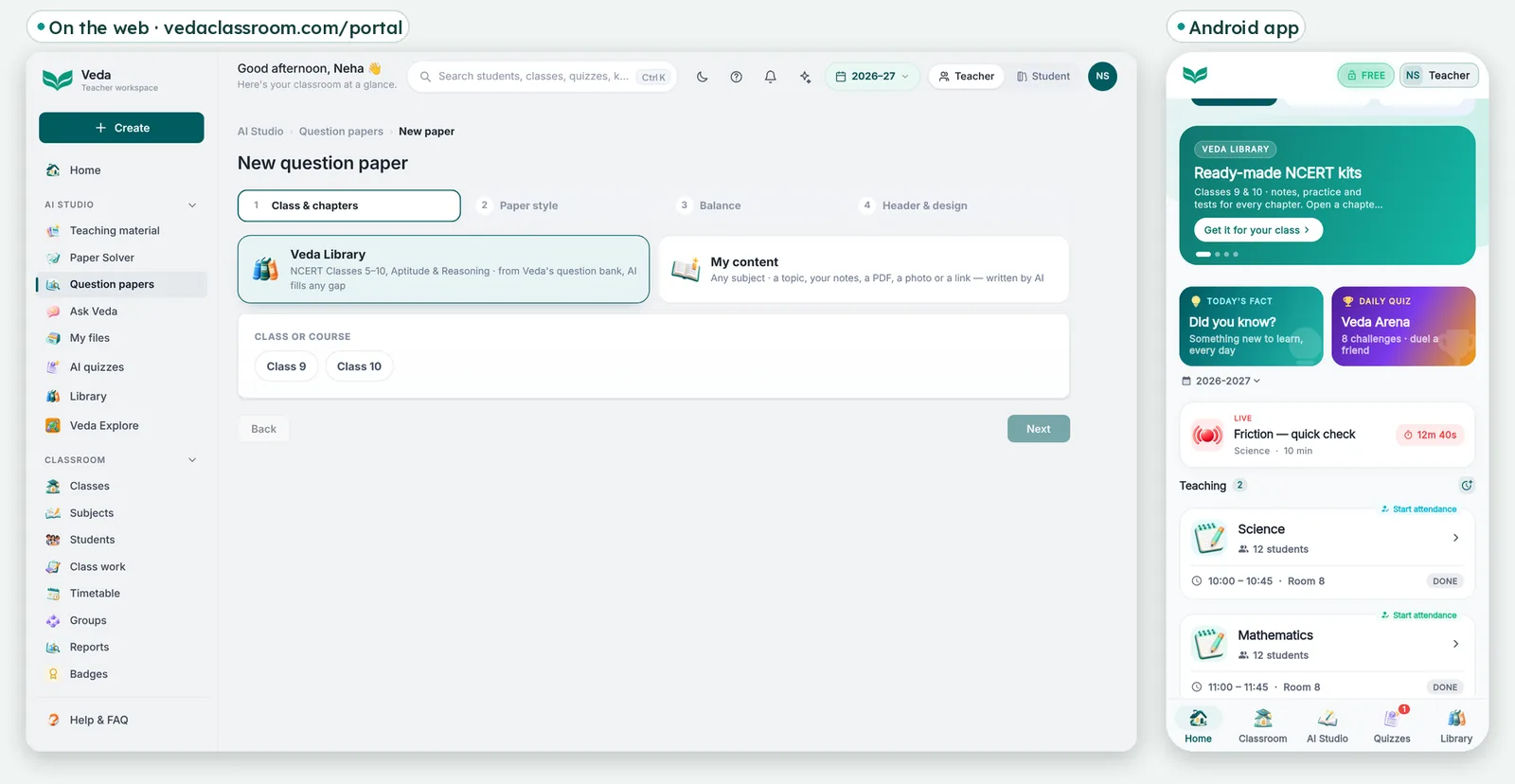
The weekly paper is where students practise under exam conditions. Open Question papers and choose a source: Veda Library, which uses Veda's question bank (for example NCERT Classes 5 to 10, and Aptitude & Reasoning), or My content, where the AI writes questions from your own topic, notes, PDF, photo or link in any subject.
- Class and chaptersor your own content
- Paper styleobjective, mixed, long answer or custom
- Balanceeasy, balanced or challenging
- Header and designyour coaching centre's name and batch
The header has a Coaching option, so it reads Coaching centre name, Branch and Batch rather than School and Class. When it is done, you can swap, edit, lock or reorder any question, make extra sets so neighbours get different papers, add a second language under every question, and download the paper, answer key, marking scheme and OMR sheet as PDF or Word.
After you mark the paper, record the marks against an assessment with its maximum marks. On the web you can paste a whole column of marks at once.
Step 4: Attendance, and a report a parent can read
Take attendance at the start of each session: P, A, L or E for each student, Mark all present, then change the few who are missing. You can correct a past session later. Parents of coaching students usually ask two things: is my child coming, and how are they doing. Veda keeps both in one place.
- Student profileattendance and marks together, Print profile
- Attendance summarypresent, absent and % per student, in Excel
- Marks sheetevery assessment, print or Excel
- Quiz reportevery student against every quiz, by subject
You can save a parent contact on each student's record. For notices such as a holiday or a test date, Announcements reach a whole class or one subject.
What it can't do, and what to check
- Check every AI question. The AI can write a question with a wrong key or one that is outside your syllabus. You review before publishing, so take that step seriously.
- Daily quizzes need Android. Students play class quizzes in the Veda app on Android. For students without one, use the printed weekly paper.
- Nothing goes to parents by itself. Veda gives you the report; you decide when and how to share it.
- Credits. AI quizzes and question papers use credits, including papers from Veda's question bank. The free plan includes a monthly allowance. Batches, groups, attendance, marks, reports and Excel imports are free on every plan.
The same account works on the web at vedaclassroom.com/portal and in the Android app. Make papers on the computer; take attendance and run quizzes from your phone. More on papers in mock tests for coaching classes, and on parent reports in monthly attendance reports for parents.
Questions coaching teachers ask
Can I use my own question bank?
Yes. Import it from Excel into a quiz, or give your notes and old papers to the AI as My content for a question paper.
Does it work for competitive exam coaching?
Papers and quizzes from your own content work for any subject. Veda Library also includes Aptitude & Reasoning.
Can the weekly paper be in two languages?
Yes. Use Bilingual on the paper and pick a second language; it is written under every question. Useful when a batch mixes students from different mediums.