
AI Teaching Material for Teachers: Make It, Then Give It to a Class
Turn a chapter, your notes or a YouTube link into study material, flashcards, MCQ practice and notes with AI, check it, then give it to a class and see who opened and finished it.
By Miss Shanti Divaraniya, Co-founder
To make teaching material with AI in Veda, open AI Studio as a teacher. It asks "What will you teach today?" and offers Study Material, Chapter Material, Flashcards, MCQ Practice and Notes. Type the topic, attach the chapter PDF or a photo of the page, or paste a YouTube or web link, choose the language, and the AI builds the material in a minute or two. Read it through, then use Give to a class. It appears for your students in the app and on the web, and the kit shows you who opened it, who started and who finished.
The work of preparing revision material is mostly copying: notes out of the textbook, questions out of the guide, cards onto paper. We wanted that first draft done for you, from the chapter you actually teach, so the evening goes into reading and correcting rather than writing it out. It works the same whether you teach in a school, a college, a coaching class or a tuition centre. The checking stays yours.
What you can make
- 📚 Study Materialone topic five ways, plus games; about a minute
- 📘 Chapter Materiala chapter split into topics; a minute or two
- 🃏 Flashcards12 to 16 cards in about 20 seconds
- ✅ MCQ Practicethree levels, each answer explained
- 📝 Notessummary, key points, full explanation
Notes suit students who were absent or who revise by reading.
The same AI Studio has Paper Solver, Question papers and Ask Veda tabs. Ask Veda is useful while you prepare: "a simple analogy for photosynthesis" or "common mistakes in fraction problems" are the kind of questions it is good at.
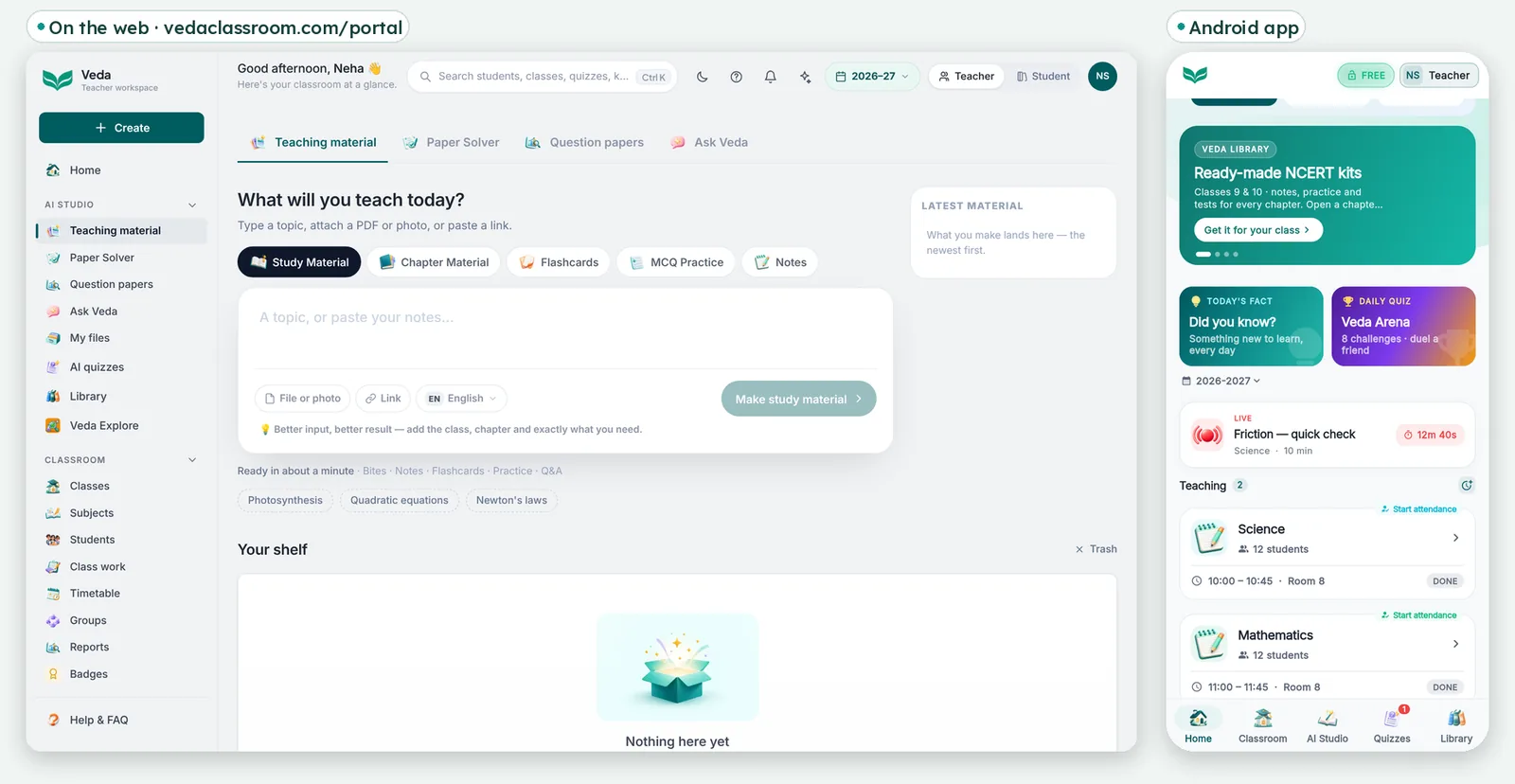
From your chapter, not a generic one
A typed topic works, but material made from your own pages fits your class better. Attach the chapter PDF, a Word or PowerPoint file, a photo of the textbook page or of your own handwritten notes, or a YouTube or web link you already use in class. You can paste your typed notes too. Last year's notes, read by Veda's AI and turned into flashcards and practice for this year's batch, use the examples you already teach with.
Pick the language before you make it. More than 40 languages are available, so a Gujarati-medium school, a Spanish-language college course or an Arabic-medium tuition class gets material in its own language, with technical terms the way the textbook keeps them.
Give it to a class
- Read it through first. Open each tab. Check the notes against the textbook and answer a few MCQs yourself.
- Press Give to a class. Choose a class or a group. You can set the dates it is available from and until, and file it under a subject.
- Know that giving it publishes it. A draft kit becomes published when you assign it, and the screen says so before you confirm.
- Students find it in the Android app or on the web. It is one account on both, so you can make the kit on a computer at vedaclassroom.com/portal and check it on your phone.
You can also share a kit by link. In Share, you choose whether only you can open it, or anyone with the link.
See how it is going
Each kit has a "How it is going" view: how many students opened it, started it and finished it, the average progress, and a list of who has opened it with each student's progress. It is the quickest way to see who did the revision before the test and who did not.
- Makefrom your own chapter
- Checkread every tab first
- Giveto a class or group
- Trackwho opened, started, finished
Then Add more where the class needs it, and go round again.
Turn it into a test or a live quiz
- Kit testMCQs with a count, a level and a time limit
- Live class quizan AI quiz with From a kit as source
- Printed paperQuestion papers, with an answer key
- Share linkonly you, or anyone with the link
Students play class quizzes in the Android app, and you watch the results come in.
Change it later
Use Add more to add pieces a kit does not have yet, such as Bites, Flashcards or MCQ practice, or to add more material: new bites and cards are written from it, and the summary refreshes, without removing what is there. In kit settings you can rename it, make a copy for another batch, or move it to the trash.
What it can't do, and what to check
- The AI makes mistakes. A wrong answer in an MCQ or a muddled line in the notes will reach every student you give the kit to. Read it before you assign it, and use Report a problem on a topic if something is wrong.
- It does not know your lesson plan. It knows the material you gave it. What you stressed in class, and what you skipped, only you know.
- It uses AI credits. Making material uses credits; the free plan includes a monthly allowance. Sharing your own PDFs, notes and links with a class under Study materials does not use credits and is free on every plan.
- Students need to be in the class. A kit given to a class reaches the students who have joined it. See getting your students into the app.
All the free classroom tools, such as attendance, marks and the teaching journal, are listed on the free teacher tools page, and the Android app is on the download page.
Questions teachers ask
Can I make study material from my own notes?
Yes. Attach a photo or PDF of your notes, or paste them typed. The material is written from what you give it.
Can I see whether students used it?
Yes. Each kit shows how many students opened, started and finished it, the average progress, and who has opened it.
Is it free?
Veda is free to start. Making material with AI uses credits, and the free plan includes credits every month. Giving material to a class and seeing their progress do not use credits.